Shwmae: Intro from a slightly lost goblin

Hello!
I wanted to introduce myself and I have several questions and challenges navigating the material…

But first: dw i’n joio dysgu Cymraeg gyda SSIW!!!

I’ve lived in Wales for about 20 years and have taken courses, tried singing along with kids music videos, watched children’s TV shows… To no avail. I can manage basic greetings but get so lost after that…

But I feel like something has now changed.

I’ve tried the old ssiw challenges several times over the years and this is the first time it’s clicking because I read Aran’s neuroscience notes and it gave me the heart to press on and accept the frustration (also I found the vocab lists so could check what I was hearing visually, which really helps with my audio processing trouble)…

And much gratitude to Margaret Hall’s video on YouTube about ssiw with working memory challenges. Starting to speak before Aran has finished giving the whole prompt was a game changer (and challenges a different part of my brain, which is no bad thing!)

I love that the app has the option to display the prompt - though it took me a bit of poking around to work out half of how to use it, currently mostly continuing to play the mp3s (particularly because the voices are so slow on the app that I get distracted - is there a way for me to speed the replays up a little? Love how clear they are mind!)

However!

:laptop: Technical things: :laptop:

(I subscribed yesterday!)

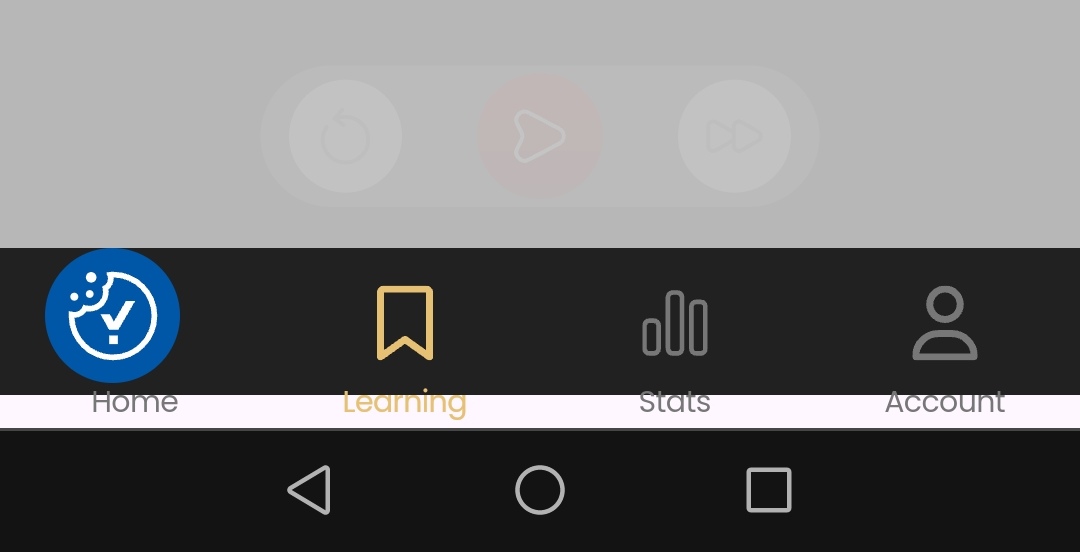
:laptop: On the app in my (android) phone the “cookies” button covers the “home” button, so I don’t know what the home page should look like as I can’t open it.

:laptop: The learning page showed with a white filter so, again, couldn’t use it and had to go on the Web version.

:laptop: Today neither web nor app will let me log on so I can’t access the “automatic” bit. It says “Unknown error”.

And :brain: Confused learner things: :brain:

:brain: I’m not sure how the old challenges line up with the new app levels, I think I’ve worked out how to reset the “belt” I’m on, but I don’t know what to set it to - any pointers? (I 've just finished challenge 4) or should I just start at the start?

:brain: When I click “skip”, what exactly is it skipping?

:brain: I get the impression that there are resources / I’m missing, not really sure how to get the best out of this space other than just doing the challenges (via mp3 or the app) and asking a question here if I get stuck, and then look at Advanced Material after that… Is there a page that lists options and suggestions?

I love the encouragement here, and totally understand that there’s stuff in development and many years of old material that might reference stuff that isn’t quite relevant anymore… So I’d really appreciate some signposting so I stop getting distracted by it all :sweat_smile:

Oh, and the introduction: I’m Halo, storyteller, philosopher, and folklore enthusiast living in West Wales. I run an annual (ish) alternative event called “The Goblin Masquerade” - hence the Goblin reference! - and I’m creating a Museum of Magic and Folklore, online and with a physical venue coming up. I’d really love to be able to read and answer the Welsh emails I get, given the site is bilingual, so that’s one of my goals for learning, aside from everyday conversation and incorporating some into my storytelling!

Anyway… Nice to “meet” you all!
~Halo

2 Likes

Shwmae @Halo!

Croeso and let’s see if I can illuminate things a little for you.

Firstly the technical issue. We did have a hiccup with some accounts very recently, which has been fixed, but perhaps yours was one of those. It sounds like the error people reported, so give it another try and see how you get on.

Do you have the latest version of the app - SaySomethingin? Check in Google Play to see if there is a later version. I’ve never seen a Cookies button in the app, so I’m not sure why you’re seeing that. If you click on it, does it go away?

The web browser version is at app.saysomethingin.com so try logging in there first and see how you get on.

If you continue to have technical problems, the best thing is to email support@saysomethingin.com with screenshots of the issue if possible, and we’ll be able to sort things out for you.

Level 1 Challenge 4 is equivalent to around Orange + Black stripe, so you could move yourself there if you like. Did you discover that you can click on Account, then My Languages, then tap the pencil until it changes to an X? Then tap the belt colour and you’ll be able to change it to a different one.

“Skip” just jumps you over the practice of the current “Introduction Item” and gives you the next one, so if you’re confident with the current one and the material gone before so you don’t feel you need any revision, you can just skip along to the next Introduction Item.

Your subscription also entitles you to join our SSiW Community Chat Slack group and participate in online partner and group chats led by a tutor. They really help your Welsh to develop so I’ve sent you an email invitation to join that.

Learning with the app is the way to go, but the Challenges and the audio files for the Original course are still available through the website as many people like to use them as extra practice. They’re particularly useful for when you don’t have a WiFi connection and you don’t want to run up your mobile data allowance, as you can download them ahead of time, then use them to practise offline.

And that’s it really - enjoy the learning, immerse yourself in Welsh as much as you can with Radio Cymru or Welsh music playing in the background, and see if you can take part in the online chats.

Pob hwyl!

Diolch yn fawr, @Deborah-SSi! That’s a good thought re the updated app - I got a prompt from the web page to download and install the app so perhaps that was not the way to go! The app from the store is not showing the cookies button, but still won’t let me log in, on the app or the Web version on my phone, so I’ll email support about that

Thanks for the clarification - yes, I’d seen how to update the belts manually but they weren’t showing any clue as to what they correlated with so I wasn’t sure where to edit it to.

And… Thank you for the invite. I’ve never used slack (have been avoiding adding yet another platform!) but I’ll check it out. Conversational practice would definitely be helpful soon.

Hope you’re having a good day, I was woken early by thunder this morning so have already started on challenge 5 while I wait for the app to work :grin:

~Halo

1 Like

Would you mind posting the URL of the webpage that you used initially and got the Cookies button? I’ll ask the Tech Team to investigate why that happened.

I love thunderstorms! An exciting way to wake up!

Siwr! It was actually this link:

And the cookies thing looks like this…

(hoping that shows up right!)

If I click that link on my phone it gives an option to download it as an app or add a shortcut, so I assumed it’d be the official app, but it’s not quite. I’m guessing it’s something to do with it being a “PWA”, which I saw mentioned elsewhere. I’ve installed the correct app now though!

I normally love a thunderstorm, from a distance, too :grin:

1 Like

Purely for info and to support Halo (as I always use the android app), the “cookies” button on the web app does indeed obscure the home button. It takes you to an accept/reject cookies type page. Returning to the (web) app then continues to show the cookies button obscuring the home button.

Halo - I would strongly recommend using the Android/IoS based app from Google play or apple equivalent if you get your log in issues resolved

@Halo @nigel-28 are you using that web version in a browser on your phone, or some other device? And what browser are you using?

I’m thinking it must depend on the width of your screen. I’ve just looked on my laptop and the Cookies button is way over in the bottom left of the screen while the app itself including the Home button is clearly displayed in the centre.

For info I checked on my phone (Google pixel 6a using Chrome)
Not a problem for me as I use the android app - just wanted to verify and confirm that what Halo saw is not just confined to just her.

1 Like

I’ve just checked in a browser on my phone, and yes, the Cookies button mostly covers the Home tab too, but when I turned the phone horizontally, it was fine.

I would expect most people using a phone would actually use the phone app, rather than run the web version in a browser, so it’s probably not a problem that the tech team need to worry about.

@Deborah-SSi and @nigel-28 it was the version of the app that downloaded from the browser, not playstore.

If you’ve got a technical FAQ for troubleshooting little problems then a note saying something like: “If this happens you’ve probably downloaded the browser based app, head to the playstore and download the app from there instead” would be helpful.

I don’t think it’s something that needs fixing! Just useful to have a note for someone like myself who ends up following a back road to the app, or at least if you know then if someone else flags it you know what to tell them.

Thanks @Halo. I’ve mentioned it to the Tech Team. Possibly the code could detect that someone is in a browser on a mobile phone and direct them to download the mobile version instead. I’m not sure what’s technically possible, so I’ll let them think about that.

1 Like